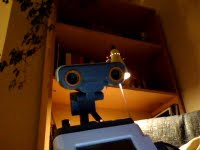
Lego NXT Workshop at Málaga University (European Robotics Week 2014)

Facebooktwitterredditpinterestlinkedinmail

lego

Dentro de las actividades de la Semana Europea de la Robótica 2014, el próximo Sábado 29 de Noviembre llevaremos a cabo un Taller Lego NXT, dirigido a ingenieros con conocimientos básicos de programación. Más información aquí.

We celebrate the European Robotics Week 2014 next Saturday 29th November with a Lego NXT Workshop, targeted to engineers with a basic programming knowledge. More info here [in Spanish]

Preinstalled Nootrix ROS Indigo VM (Xubuntu, Windows 7)

Facebooktwitterredditpinterestlinkedinmail


[In English]
La máquina virtual es la de ROS Indigo Igloo 32 bits que ofrece preinstalada Nootrix y que puede descargarse aquí.

En Xubuntu 14.04, la he instalado en Virtual Box 4.3.10. Para no perder la costumbre ;), me han surgido algunos problemas, que he resuelto como sigue:

  • Los problemas de creación o cierre del fichero .vmdk han desaparecido forzando a que, en Virtual Box, la opción Archivos -> Preferencias -> General -> Carpeta predeterminada de máquinas  contenga el directorio donde está almacenado en el fichero .ova, en lugar de modificar ese path al instalar la máquina.
  • Una vez instalada la máquina correctamente, el que ha protestado ha sido Virtual Box. Afortunadamente, en el propio error se indicaba la solución, que efectivamente funciona: The VirtualBox Linux kernel driver (vboxdrv) is either not loaded or there is a permission problem with /dev/vboxdrv. Please reinstall the kernel module by executing
    ‘/etc/init.d/vboxdrv setup’
    as root. If it is available in your distribution, you should install the DKMS package first. This package keeps track of Linux kernel changes and recompiles the vboxdrv kernel module if necessary.

En Windows 7, la he instalado en Virtual Box 4.2.10.  Aparentemente, la instalación ha ido bien.


[En español]
I have chosen the 32 bits preinstalled virtual machine of ROS Indigo Igloo offered by Nootrix here.

Under Xubuntu 14.04 I have Virtual Box 4.3.10. Just for a change ;), some issues arose, and they were solved like that:

  • Problems related to creating or closing the  .vdmk file disappeared when I forced, in Virtual Box, that the folder in  Files -> Preferences -> General -> Predetermined machine folder  (I hope I have translated this properly, since my Virtual Box is in Spanish) is the same that the folder which stores de .ova file, instead of changing that path directly when the virtual machine is installed.
  • Once the virtual machine was properly installed,  Virtual Box did not feel comfortable 😉 Luckily, the error info showed also how to solve it (and it works):  The VirtualBox Linux kernel driver (vboxdrv) is either not loaded or there is a permission problem with /dev/vboxdrv. Please reinstall the kernel module by executing
    ‘/etc/init.d/vboxdrv setup’
    as root. If it is available in your distribution, you should install the DKMS package first. This package keeps track of Linux kernel changes and recompiles the vboxdrv kernel module if necessary.

On Windows 7, I used Virtual Box 4.2.10, and everything seems to be fine by now.
Publications in education: where to go

Facebooktwitterredditpinterestlinkedinmail


[In English]
El año pasado, la E.T.S.I. Informática de la Universidad de Málaga organizó el taller “Publicaciones en Educación”, impartido por el profesor David López, de la Universidad Politécnica de Cataluña. La experiencia fue realmente interesante y amena. El profesor López ha realizado una magnífica labor de recopilación de congresos y revistas relativas a educación que dejo aquí:


[En español]
Last year, the Computer Science School at Universidad de Málaga organized a workshop  about teaching publications,  taught by Dr. David López,  assistant professor with the Universidad Politécnica de Cataluña. It was a really interesting and nice experience.  Professor López has done an invaluable job gathering conferences and journals about education, that can be consulted in the following (the links are in Spanish, but the information about journals and conferences is easily understandable):


DEM 3D printing

Facebooktwitterredditpinterestlinkedinmail

Dos enlaces sobre DEMto3D, una herramienta desarrollada en la Universidad de Jaén (España) para realizar impresiones 3D de MDE:

Two links (in Spanish) about DEMto3D, a tool developed at Universidad of Jaén (Spain) for 3D printing of DEM:


Octave 3.8.1-1 + Xubuntu 14.04

Facebooktwitterredditpinterestlinkedinmail


[In English]
La instalación la he hecho desde Synaptics, escogiendo no sólo Octave, sino prácticamente todos los paquetes 🙂 Cosas a tener en cuenta:

  • No instalar Qt-Octave, ya no se usa; para usar Octave con GUI, llamarlo así: octave –force-gui (aunque en esta versión de Octave aún no está perfecto).
  • Algunos de los paquetes instalados han provocado warnings al ejecutar Octave; estas son las soluciones que he encontrado (aka googleado :)), siempre instalando/desinstalando desde Synaptics:
    • Desinstalar octave-strings-1.1.0, msh, octave-specfun.
    • Instalar dx.
  • Algunas funciones gráficas (rlocus, por ejemplo) no funcionan correctamente: se abre la ventana, pero está vacía. El problema está en la toolkit gráfica por defecto (fltk). He encontrado dos posibles soluciones:
    • Usar otra toolkit: graphics_toolkit(“gnuplot”); pero a mí me parece que la calidad no es buena.
    • Usar alguna de las soluciones de este enlace (a mí la primera me ha funcionado).


[En español]
I have done my installation from Synapctics. I chose Octave and almost any other related package 🙂 These are some issues to take into account:

  • Qt-Octave shouldn’t be installed, it is not longer used. In order to use a GUI for Octave, you should run it like that: octave –force-gui (though in this Octave version is not totally finished).
  • Some of those installed packages gave rise to some warnings; after some research (aka googling :)), this is how I have fixed them, always installing/uninstalling from Synaptics:
    • Uninstall octave-strings-1.1.0, msh, octave-specfun.
    • Install dx.
  • Some graphical functions (like rlocus) do not work properly: they open a blank window. The problem is related to the default graphical toolkit (fltk). I have found two possible solutions:
    • Use another toolkit: graphics_toolkit(“gnuplot”); in my opinion, it does not have the best quality.
    • Use some of the solutions shown in this link (the first one worked for me).

About educational systems

Facebooktwitterredditpinterestlinkedinmail

Un artículo de Amy S. Choi sobre los dos mejores sistemas educativos del mundo. Me quedo con esta frase:

A post by Amy S. Choi about the two most recognized educative systems in the world. I would highlight this sentence:

“In the most successful education cultures in the world, it is the system that is responsible for the success of the student, says Schleicher — not solely the parent, not solely the student, not solely the teacher.”

Nice things with Lego NXT

Facebooktwitterredditpinterestlinkedinmail

Dos vídeos muy interesantes del trabajo de nuestros alumnos en la Universidad de Málaga usando el robot Lego NXT:


Two interesting videos with work of our students at University of Málaga using Lego NXT robot: